
 |
|
Home
|
|
|
What's Zulu?
|
|
|
Guide
|
|
|
Reference
|
|
|
Tutorial
|
|
|
Quickstart
|
|
|
Live Sites
|
|
|
Sample Templates
|
|
|
Installation
|
|
|
Download
|
|
|
Sitemap
|
|
Deutsch |
|
|

Transforming the Excel table into XML
The transformation of the Excel-structure into XML is generic. Here is an explanation of how the Excel-fields are translated into XML.
File name
The file name is the name of the Excel file except for its extensionxml.Structure of the XML-document
The XML document has a clear structure. First Excel describes itself:
<?xml version="1.0" encoding="ISO-8859-1"?>
<content>
  <creator>
    <program>ExcelXmlDump v1.0.0</program>
    <date>2003-03-13 15:15:33</date>
    <excel_filename>zulu_structure.xls</excel_filename>
    <excel_path>C:\Data\Projekte auf Falbala\Project Zulu\Zulu Version 2\Python Samples\zulu_2003-03-12a_v2.0.0b\current\zulu_templates</excel_path>
  </creator>
  <----------- The code fragments (lines and tables) are inserted here.
</content>
Lines
The keyword is always in the second column of the Excel-table. if the text in this second column ends with a colon ':', then the line is written into the XML-file.Tag, a, b und c must stand in the
columns 3, 4, 5, 6. The cell colors are ignored.
This line is represented in the XML-file as following:
<Comment>
<tag>Template</tag>
<a><!--Zulu:Comment:Begin--></a>
<b><!--Zulu:Comment:End--></b>
</Comment>
Tables
If the text in the second column ends with a '>', then it
marks the beginning of a new table. The table consists of all following lines
which cell in the second column ends with a colon ':'.
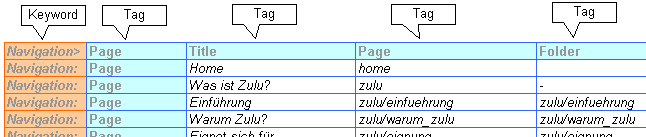
This table is represented in the XML-file as following:
<Navigation type="table">
<Page>
<Title>Home</Title>
<Page>home</Page>
<Folder></Folder>
<Link><!--Zulu:Root-->index.html</Link>
<MetaDescription>Zulu by Positron and Maerki Informatik</MetaDescription>
<MetaKeywords>Zulu Website Assembler Positron Maerki Informatik Schweiz Switzerland</MetaKeywords>
</Page>
<Page>
<Title>Was ist Zulu?</Title>
<Page>zulu</Page>
<Folder>-</Folder>
<Link><!--Zulu:Root-->zulu/einfuehrung/index.html</Link>
<MetaDescription></MetaDescription>
<MetaKeywords></MetaKeywords>
</Page>
<Page>
<Title>Einführung</Title>
<Page>zulu/einfuehrung</Page>
<Folder>zulu/einfuehrung</Folder>
<Link><!--Zulu:Root-->zulu/einfuehrung/index.html</Link>
<MetaDescription></MetaDescription>
<MetaKeywords></MetaKeywords>
</Page>
...
</Navigation>
