
 |
|
Home
|
|
|
What's Zulu?
|
|
|
Guide
|
|
|
Reference
|
|
|
Tutorial
|
|
|
Quickstart
|
|
|
Live Sites
|
|
|
Sample Templates
|
|
|
Installation
|
|
|
Download
|
|
|
Sitemap
|
|
Deutsch |
|
|

Introduction
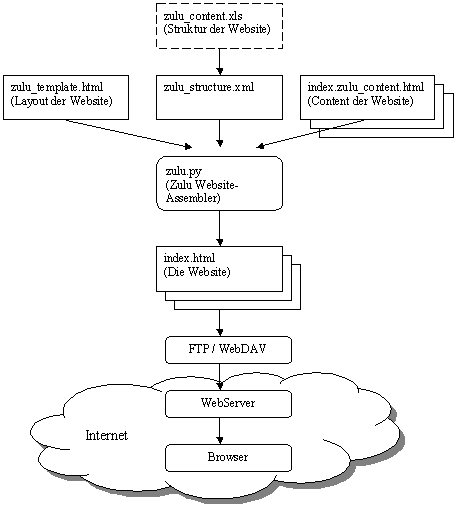
Layout, structure and content
Insert content
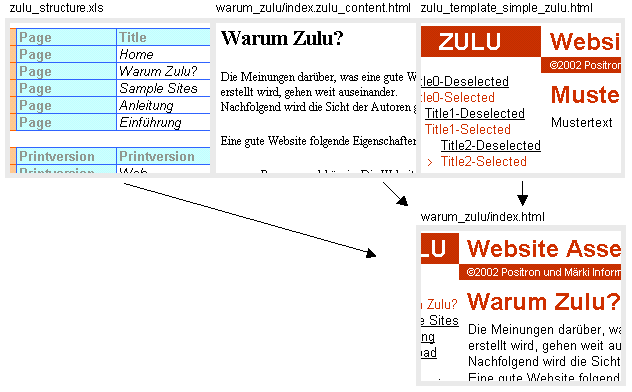
The web pages are assembled according to the structure (Excel: zulu_structure.xls), the content-files and the template.
For to each line 'Page' in the Excel sheet a webpage-file is assembled. The content is merged with the layout (template) creating the file which is the relevant webpage.
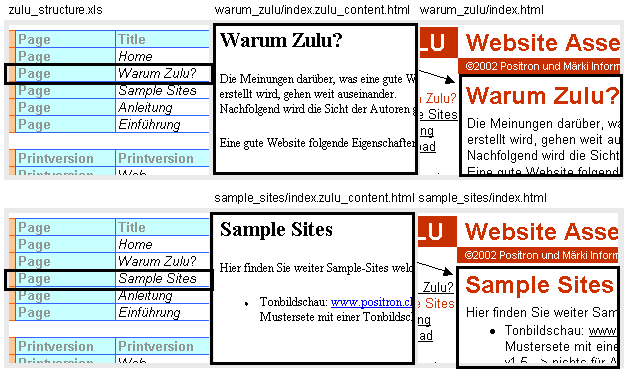

Example: Assembling the webpage "Why Zulu?": Detailed description.
- Find the template and open it:

According to the 'Printersion' entry in line 'Web',<!--Zulu:Tag:Printextension-->is replaced by".html".
The path is given relative to the location of the Excel file. Consequentlyzulu_template_current.htmlis in the same directory as the Excel file. This template-file is now read. - Find the content:
Excel line "Input:"

Excel table "Navigation:"

...

<!--Zulu:Tag:Folder->is replaced according to the 'Page' entry in the Excel table 'Navigation'. The resulting input content-file is../zulu/warum_zulu/index.zulu_content.htmlwith its path given relative to the Excel file. This content-file is now read. - Insert the content:
In the template-file found in step 1<!--Zulu:Tag:Content-->is substituted by the content found in step 2. - Build the website navigation:
This step is discussed in the following chapter. - Save the HTML-page:
Excel line "Output:"

With all tag replacements the resulting HTML-file is../zulu/warum_zulu/index.html.
Again the resulting path is given relative to the Excel file. Die HTML-page is now assembled and finally saved.
