|
ZULU |
Website Assembler |
|
©2002 Positron und Märki Informatik |
|
Anleitung Navigation |
| Druckversion |
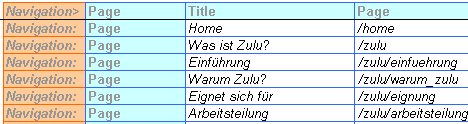
Zulu can build a navigation bar on each webpage. Zulu knows according to the
column Page in the Excel file which webpages exist and how to
arrange them in the navigation bar.
Example: The page "Home" is on the same level as the page "What's Zulu?". The page "Introduction" is a subchapter of chapter "What's Zulu?".
The appearance of the navigation bar such as its font size, spacing etc. is
variable. The layout is defined by the template:
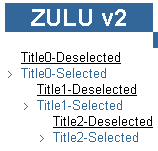
The chapter which is currently selected can be emphasized within the navigation bar. For each hierarchy the template contains a sample of a selected and an unselected entry.
Example template entry: Level 0 selected:
<!--Zulu:Template:Selected:Page:0:Begin-->
<span style="font-family: courier; color: #336699">> </span><span style="font-family: arial; color: #336699"><!--Zulu:Tag:Title--><!--Zulu:Comment:Begin-->Title0-Selected<!--Zulu:Comment:End--></span><br>
<!--Zulu:Template:Selected:Page:0:End-->
Example: Building a navigation bar on the webpage "Why Zulu?":
<!--Zulu:Python:zulu:menu:Page:0:0-->
with the navigation bar.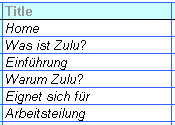
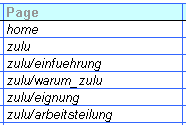
<!--Zulu:Tag:Title--> is
replaced by the text in column 'Title': "Why Zulu?".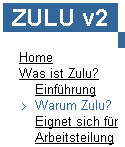
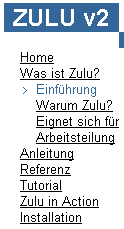
With a growing number of entries the navigation bar can become very long. It can be made smaller by only showing subchapters which are within the selected path.
This is done by using the following tag in the template: <!--Zulu:Python:zulu:menu:Page:0:0-->
Example webpage "Introduction": Show only subchapters within the selected path.
<!--Zulu:Python:zulu:menu:Page:0:0-->
 |
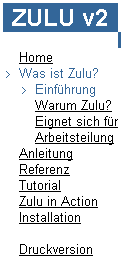
Example webpage "Introduction": Show only subchapters within the selected path. The subordinate chapter is marked as well.
This setting is used by the template Nokia.
<!--Zulu:Python:zulu:menu:Page:0:1-->
 |
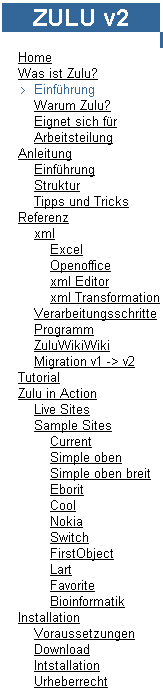
Example webpage "Introduction": Show all menu entries:
<!--Zulu:Python:zulu:menu:Page:1:0-->
 |
Most links point to an internal page.
In column "Link" is the text
<!--Zulu:Root-->zulu/eignung/index.html. Zulu replaces the
tag
<!--Zulu:Root--> by adjusting the relative link with respect
to the current page.
Normally there is a webpage to each entry in the navigation bar. But it is also possible to define a title without its own webpage but which points to another webpage. This is indicated by a "-" in the column 'Folder' as illustrated by the following example:
The title "What's Zulu" points to the webpage zulu/einfuehrung/index.html.
Therefore the title "What's Zulu?" and "Introduction" point to the same webpage.
Example: The title "Migros" points to www.migros.ch.
| Zulu Website-Assembler v4.0.5 Content Template Structure |


