ZULU

 Website Assembler


©2002 Positron und Märki Informatik

Home

Was ist Zulu?

   Einführung

   Warum Zulu?

   Eignet sich für

   Arbeitsteilung

Anleitung

   Einführung

   Aufbau der Tabelle

   Navigation

   Site Map

   Tipps und Tricks

Referenz

   xml

      Excel

      OpenOffice

      xml Transformation

   Versteckte Seiten

   Private (Parent)

      Private (Child)

   Verarbeitungsschritte

   Programm

   ZuluWikiWiki

   Migration v1 -> v2

   Migration v2.0 -> v2.1

   Migration v2.1 -> v4.0

Tutorial

   Für Anfänger

   Experimentieren

   Für Fortgeschrittene

   Tools

   Mehrsprachiges Zulu

   MacOSX, OpenOffice

Quickstart

   Einsprachig (externer Link)

   Mehrsprachig (externer Link)

   Zuluplan (externer Link)

Live Sites

Beispiel Templates

   Current

   Favorite

   xsummit

   Simple oben

   Simple oben breit

   Eborit

   Cool

   Nokia

   Switch

   FirstObject

   Lart

   Bioinformatik

   Twinhelix

Installation

   Voraussetzungen

   Installation

      Windows

      Linux

      Mac OS X

   Urheberrecht

Download

Uebersicht

 
 Druckversion

Introduction

Layout, structure and content

Insert content

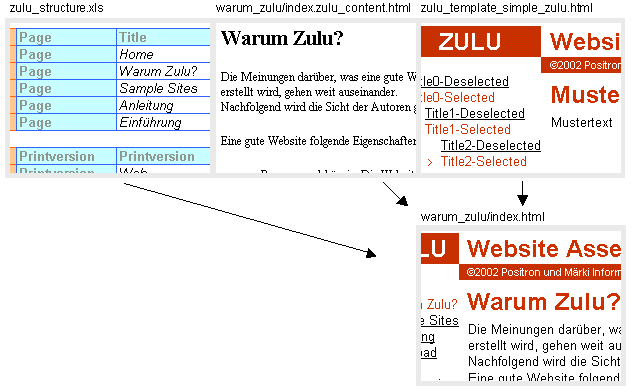
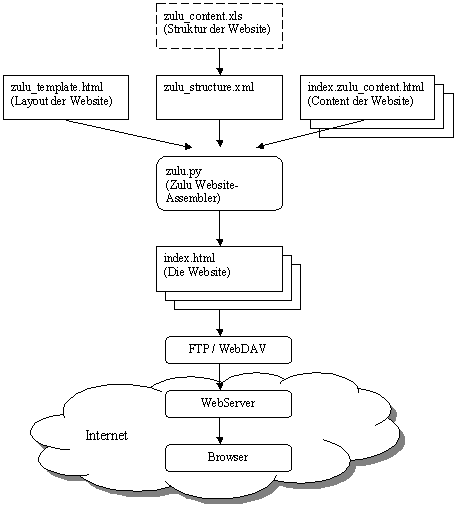
The web pages are assembled according to the structure (Excel: zulu_structure.xls), the content-files and the template.

For to each line 'Page' in the Excel sheet a webpage-file is assembled. The content is merged with the layout (template) creating the file which is the relevant webpage.
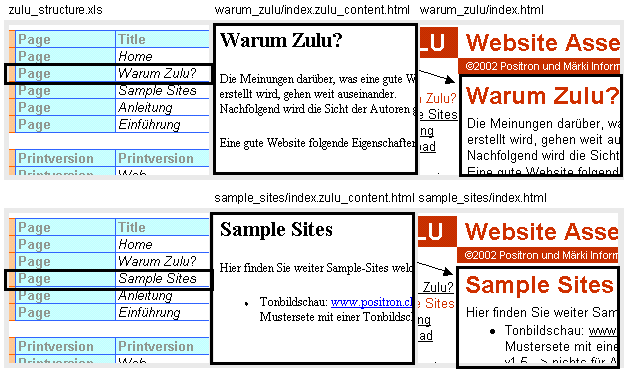

Example: Assembling the webpage "Why Zulu?": Detailed description.

  1. Find the template and open it:

    According to the 'Printersion' entry in line 'Web', <!--Zulu:Tag:Printextension--> is replaced by ".html".
    The path is given relative to the location of the Excel file. Consequently zulu_template_current.html is in the same directory as the Excel file. This template-file is now read.
  2. Find the content:
    Excel line "Input:


    Excel table "Navigation:

    ...


    <!--Zulu:Tag:Folder-> is replaced according to the 'Page' entry in the Excel table 'Navigation'. The resulting input content-file is ../zulu/warum_zulu/index.zulu_content.html with its path given relative to the Excel file. This content-file is now read.
  3. Insert the content:
    In the template-file found in step 1 <!--Zulu:Tag:Content--> is substituted by the content found in step 2.
  4. Build the website navigation:
    This step is discussed in the following chapter.
  5. Save the HTML-page:
    Excel line "Output:

    With all tag replacements the resulting HTML-file is ../zulu/warum_zulu/index.html.  
    Again the resulting path is given relative to the Excel file. Die HTML-page is now assembled and finally saved.


Zulu Website-Assembler v4.0.4    Content     Template     Structure