
Was ist Zulu?
Anleitung
> Einführung
Aufbau der Tabelle
Navigation
Site Map
Tipps und Tricks
Referenz
Tutorial
Quickstart
Live Sites
Beispiel Templates
Installation
Download
Uebersicht
Introduction
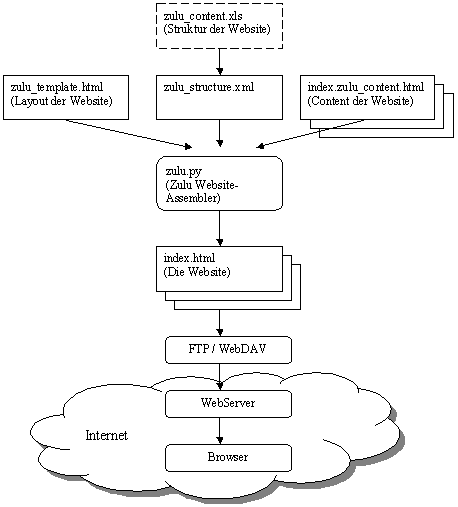
Layout, structure and content
Insert content
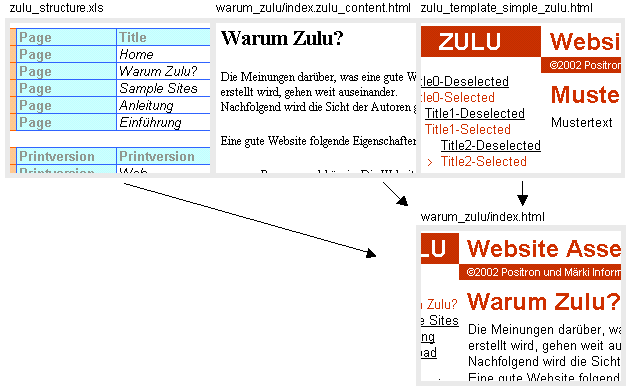
The web pages are assembled according to the structure (Excel: zulu_structure.xls), the content-files and the template.
For to each line 'Page' in the Excel sheet a webpage-file is assembled. The content is merged with the layout (template) creating the file which is the relevant webpage.
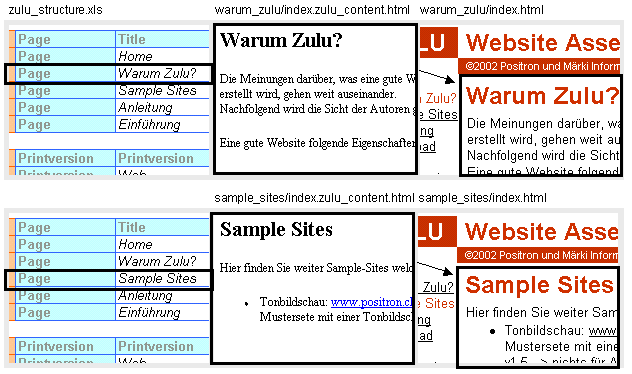

Example: Assembling the webpage "Why Zulu?": Detailed description.
- Find the template and open it:

According to the 'Printersion' entry in line 'Web',<!--Zulu:Tag:Printextension-->is replaced by".html".
The path is given relative to the location of the Excel file. Consequentlyzulu_template_current.htmlis in the same directory as the Excel file. This template-file is now read. - Find the content:
Excel line "Input:"

Excel table "Navigation:"

...

<!--Zulu:Tag:Folder->is replaced according to the 'Page' entry in the Excel table 'Navigation'. The resulting input content-file is../zulu/warum_zulu/index.zulu_content.htmlwith its path given relative to the Excel file. This content-file is now read. - Insert the content:
In the template-file found in step 1<!--Zulu:Tag:Content-->is substituted by the content found in step 2. - Build the website navigation:
This step is discussed in the following chapter. - Save the HTML-page:
Excel line "Output:"

With all tag replacements the resulting HTML-file is../zulu/warum_zulu/index.html.
Again the resulting path is given relative to the Excel file. Die HTML-page is now assembled and finally saved.
©2002 Positron und Märki Informatik, LGPL |