 |
|
Erweiterte Suche Einstellungen Sprach-Tools Suchtipps | |
| Suche: Das Web Seiten auf Deutsch Seiten aus der Schweiz |
|
|
|
|
|
|
|
|
|
|
|
|
| Einführung Aufbau der Tabelle Navigation Site Map Tipps und Tricks Print |
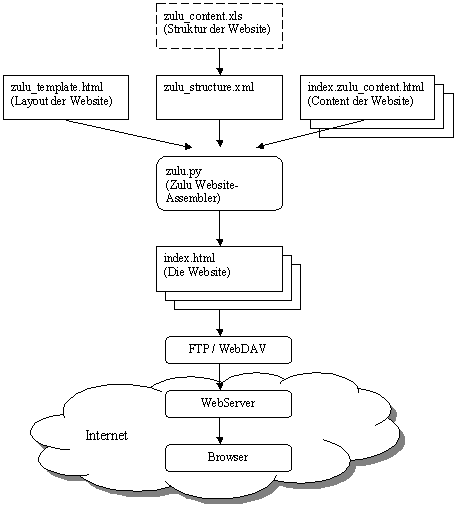
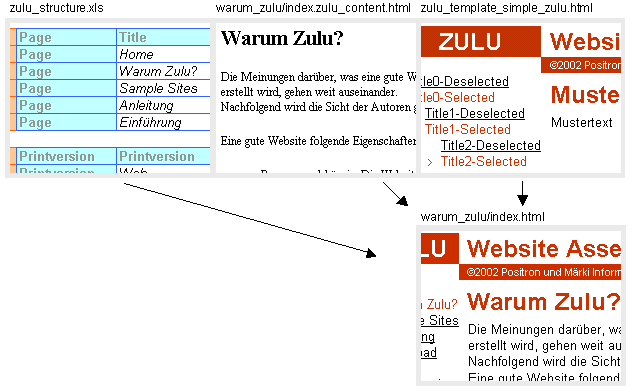
The web pages are assembled according to the structure (Excel: zulu_structure.xls), the content-files and the template.
For to each line 'Page' in the Excel sheet a webpage-file is assembled. The content is merged with the layout (template) creating the file which is the relevant webpage.
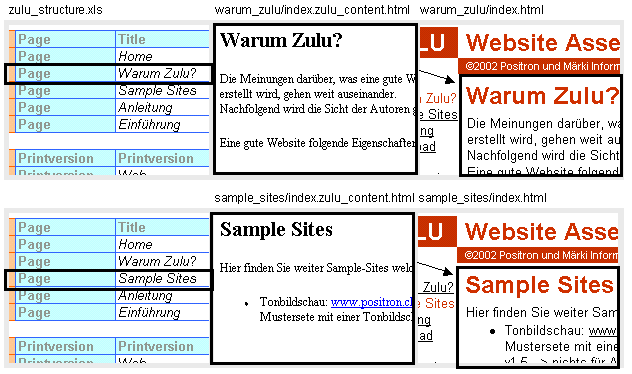

Example: Assembling the webpage "Why Zulu?": Detailed description.

<!--Zulu:Tag:Printextension--> is replaced by ".html". zulu_template_current.html
is in the same directory as the Excel file. This template-file is now read.Input:" 
Navigation:" 

<!--Zulu:Tag:Folder-> is replaced according to the 'Page'
entry in the Excel table 'Navigation'. The resulting input content-file is ../zulu/warum_zulu/index.zulu_content.html
with its path given relative to the Excel file. This content-file is now
read.<!--Zulu:Tag:Content-->
is substituted by the content found in step 2.
Output:" 
../zulu/warum_zulu/index.html.